


InsForge Payments now supports Razorpay.
For a lot of teams, payment integration starts with whatever provider is already familiar. But that default changes quickly depending on where you build. Developers building for India often need Razorpay as their primary payment provider, with local payment methods, native Razorpay Checkout, subscriptions, and a setup flow that matches how Razorpay is actually used in production.
That is why this integration matters. It is not just another checkbox in a provider list. It is part of making InsForge useful for teams building real products in real markets, with the payment tools their customers already expect.
What Razorpay Support Includes
With Razorpay support, InsForge Payments can now help you add Razorpay-backed billing flows to your app without wiring every operational detail by hand.
You can use it for:
- One-time payments through Razorpay Orders and Checkout.js
- Subscriptions using Razorpay plans and subscription records
- Customer visibility through synced Razorpay customer data
- Transaction tracking for successful, pending, failed, and refunded payments
- Webhook-driven fulfillment so app logic can react to real payment events
- Test and live environments from the Payments dashboard
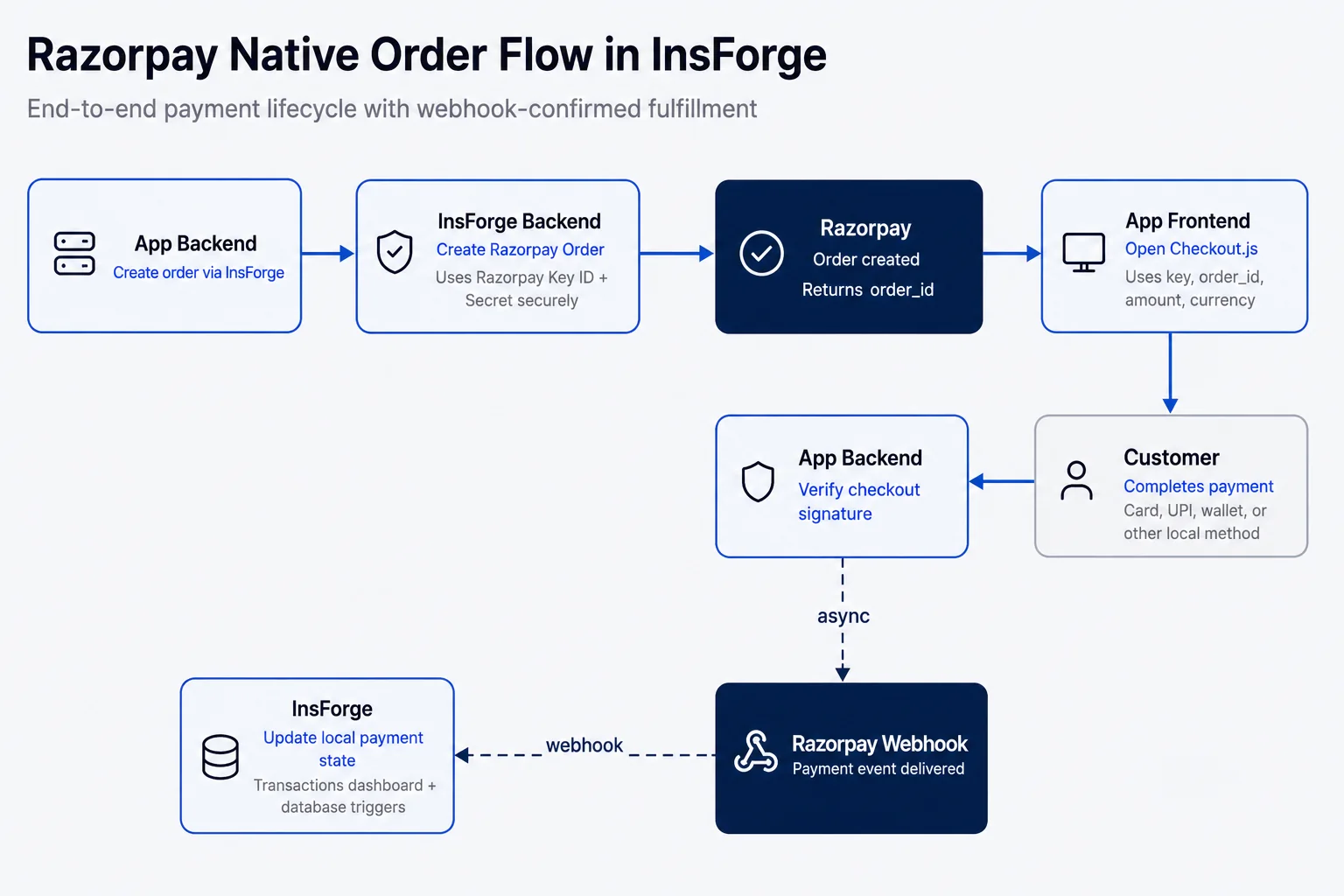
The basic workflow is simple: configure your Razorpay keys, sync your catalog and customers, create payments from your backend, let users pay through Razorpay Checkout, and use webhook-confirmed state to update your app.
How It Works in InsForge
Razorpay support is available directly in the Payments section of the InsForge dashboard. Select Razorpay as the provider, choose test or live, and configure your Razorpay Key ID and Key Secret.
From there, InsForge gives you the pieces you need to build the payment flow:
- Create Razorpay orders from backend routes
- Create and manage Razorpay subscriptions
- Pass checkout options into Razorpay Checkout.js
- Verify payment signatures after checkout
- Configure webhook delivery with the URL and secret shown in the dashboard
- Sync Razorpay items, plans, customers, subscriptions, invoices, and payments
- Inspect transactions with provider IDs that map back to Razorpay
For a one-time payment, your backend creates a Razorpay Order through InsForge, your frontend opens Razorpay Checkout.js with the returned checkout options, and your backend verifies the payment signature after checkout completes.
For subscriptions, your app can create Razorpay subscriptions and manage cancel, pause, and resume flows through backend routes. Webhooks then keep the local payment state up to date, so fulfillment logic can be driven by confirmed provider events instead of a browser redirect alone.
The goal is to keep Razorpay in charge of the payment experience while InsForge handles the backend integration surface around it: configuration, verification, sync, dashboard visibility, and the database state your app can build on.
What You See in the Dashboard
Payments are hard to debug when the only source of truth lives in a provider dashboard your app cannot inspect. InsForge gives you a local visibility layer for the parts your app needs to reason about.
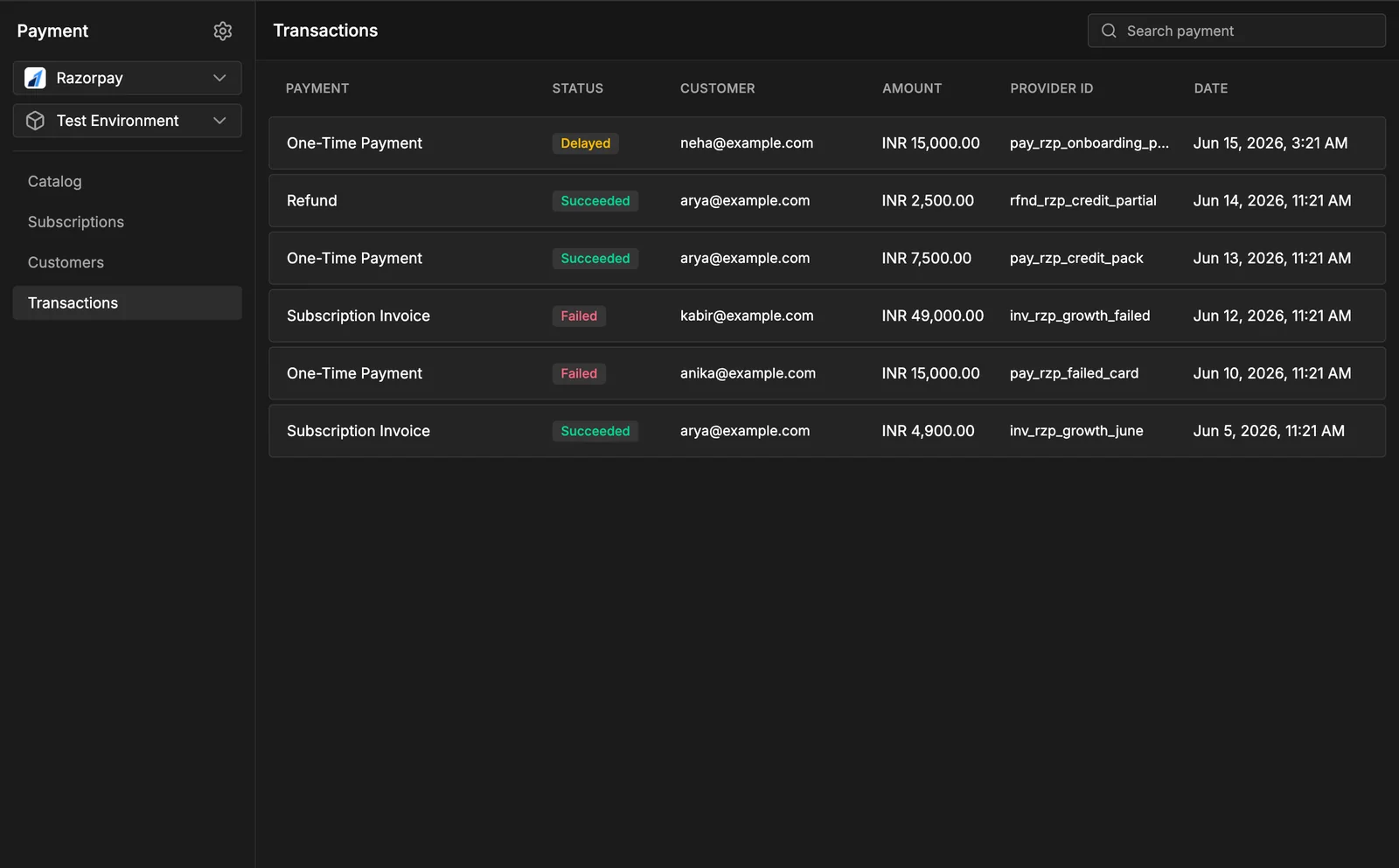
The Payments dashboard now includes Razorpay-aware views for:
- Catalog: Razorpay items and plans
- Subscriptions: recurring billing state
- Customers: synced customer records
- Transactions: payment status, amount, currency, and provider references
That last part is important. When a payment needs follow-up, you can take the provider ID from InsForge and find the exact object in Razorpay. InsForge is not replacing Razorpay's dashboard; it is making the payment state easier for your app and your team to work with.
Built With the Community
This release is also meaningful because the initial push came from the open-source community. Koduru Hemanth Reddy contributed the initiative for Razorpay support, and it is a good reminder of why we build InsForge in the open.
The best ideas about what a backend platform should support do not all come from inside the company. They come from developers building real products, in real regions, with real provider requirements.
That is the direction we want InsForge to keep moving: not just integrating with the biggest names in tech, but supporting the providers that matter in each market.
Get Started
If you are building for the Indian market and want to add payments to your app, try Razorpay in InsForge Payments:
- Open Payments Settings.
- Select Razorpay as the provider.
- Configure your Razorpay test keys.
- Sync your Razorpay data.
- Create an order or subscription from your app.
- Configure webhooks from the setup values shown in InsForge.
If something is missing for your market, we want to hear about it. Feature requests, issues, and contributions are all welcome in our GitHub repo.